

Description
Download Triangle Solver – Trigonometry, Geometry, Math Tool
The Triangle Solver is a specialized desktop utility designed to assist users in solving triangles using trigonometric principles. It accepts known side lengths and angles and computes the missing values with precision. The software detects ambiguous cases in the Law of Sines and alerts users when multiple valid triangles may exist. If the given data does not form a valid triangle—such as when the sides violate the triangle inequality—the program provides a clear notification. It also calculates the area of the resulting triangle(s), offering a complete geometric analysis. This tool is particularly useful for students, educators, and professionals in mathematics, engineering, and architecture who require quick, accurate triangle solutions. The application supports multiple languages, including German, French, and Danish, enhancing accessibility for international users. Real-world use cases include homework assignments, classroom demonstrations, technical design work, and self-study. The source code is publicly available, encouraging transparency and community contributions. The developer did not provide additional system requirements.
Key Features & Capabilities
- Trigonometric Triangle Solving – Uses the Law of Sines and Law of Cosines to calculate unknown sides and angles based on user input.
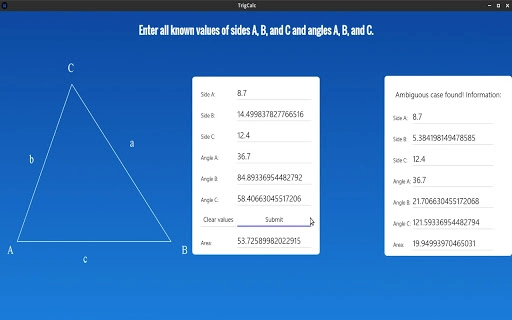
- Ambiguous Case Detection – Identifies situations where two valid triangles can be formed from the given data and notifies the user accordingly.
- Triangle Validity Check – Determines if the provided side lengths and angles can form a valid triangle, rejecting invalid configurations.
- Area Calculation – Computes the area of the resulting triangle(s), providing a complete geometric summary.
- Multi-Language Support – Offers interface support in German, French, and Danish, with ongoing improvements based on community feedback.
- Clear Values Function – The “clear values” button resets all input fields and removes any displayed ambiguous case indicators.
- Open Source Availability – The source code is accessible on the application’s website, allowing developers to inspect, modify, and contribute.
These features are ideal for users working on geometry problems that require iterative calculations. For example, a student can input two sides and a non-included angle to determine whether a unique solution exists. An educator might use the tool to demonstrate ambiguous case scenarios in a classroom setting. The area calculation is particularly helpful in real-world applications such as land surveying or architectural planning. The multi-language interface supports users across Europe and beyond, making it a valuable resource for multilingual learning environments. The developer did not specify performance benchmarks or resource usage details.
User Interface, Workflow & Performance
The user interface is minimal and focused, designed to prioritize functionality over visual flair. Input fields are clearly labeled, allowing users to enter known side lengths and angles directly. The layout supports intuitive navigation, with logical grouping of input and output fields. Users can enter data in any order, and the software processes the information automatically. The workflow is streamlined: input values → system computes results → visual feedback is provided. The program displays computed sides, angles, area, and any warnings in a structured format. If an ambiguous case is detected, a message appears to inform the user. The “clear values” button resets all fields and removes any temporary indicators. The developer did not specify resource usage details, so exact CPU or RAM behavior is unknown. Performance observations are based on general software behavior patterns. The application is expected to run efficiently on modern systems, given its small file size. Stability is not reported, but the consistent updates suggest active maintenance.
Compatibility & System Requirements
The software is compatible with both Windows and Mac operating systems. It is available as a desktop application with a file size of 1.8 MB, indicating a lightweight installation. The developer did not list specific hardware requirements, such as processor speed, RAM, or disk space. Exact system requirements were not listed. Compatibility information was partially provided. The application is designed for desktop use and does not require an internet connection for core functionality. Users can run it offline after installation. The developer did not provide information on whether the software supports older OS versions or accessibility features.
Pros and Cons
Pros
- Free to download and use with no hidden costs.
- Supports multiple languages, including German, French, and Danish.
- Accurately detects ambiguous cases in triangle solving.
- Provides area calculation for completed triangles.
- Open source with accessible code for transparency and customization.
- Lightweight at only 1.8 MB in size.
- Clear and intuitive interface for quick data entry and result viewing.
Cons
- Very limited version history, suggesting early-stage development.
- Some features, like the area function, had bugs in earlier versions.
- Developer did not provide detailed system requirements.
- Only supports a narrow set of languages despite being open source.
- No official update notifications or auto-update feature mentioned.
- Limited documentation or user guides available.
FAQ Section
Is the Triangle Solver available for Windows and Mac?
Yes, the software is compatible with both Windows and Mac operating systems.
Is the software free to use?
Yes, the application is available at no cost. There are no subscription fees or in-app purchases.
Can I use this tool offline?
Yes, the program does not require an internet connection to perform calculations or display results.
What languages are supported?
Currently, the interface supports German, French, and Danish. Additional language support is planned.
Is the source code available?
Yes, the source code is publicly available on the application’s website, allowing developers to review and contribute.
Final Thoughts + CTA
The Triangle Solver is a focused, free desktop utility that delivers accurate trigonometric calculations for triangle problems. Its ability to detect ambiguous cases and validate triangle formation makes it a reliable tool for students and educators. The multi-language support enhances its global usability, while the open-source nature promotes trust and community involvement. Although still in early development with limited documentation, its core functionality is solid and well-executed. The lightweight design ensures fast performance on most systems. For anyone working with geometry, trigonometry, or math education, this tool offers a practical, no-cost solution. Download Triangle Solver now to simplify your triangle calculations and enhance your math workflow.
Guides & Tutorials for Trigonometry Homework Helper App for Chrome
How to install Trigonometry Homework Helper App for Chrome
- Click the Preview / Download button above.
- Once redirected, accept the terms and click Install.
- Wait for the Trigonometry Homework Helper App for Chrome download to finish on your device.
How to use Trigonometry Homework Helper App for Chrome
This software is primarily used for its core features described above. Open the app after installation to explore its capabilities.
User Reviews for Trigonometry Homework Helper App for Chrome 0
No reviews found





